Method · Praktika · 3D/VFX · forward loop
Living illustration:
a seamless forward loop
How a finished, generated illustration for the Praktika app becomes a 45-second animation that repeats without a visible seam. The waterfall keeps falling downward, clouds and mist have a life of their own, and the cliffs, crystal and architecture stay exactly as they were painted. Below is the whole route from the source image to the video file: tools, rejected approaches, the loop arithmetic and the limits of the method.
What to watch
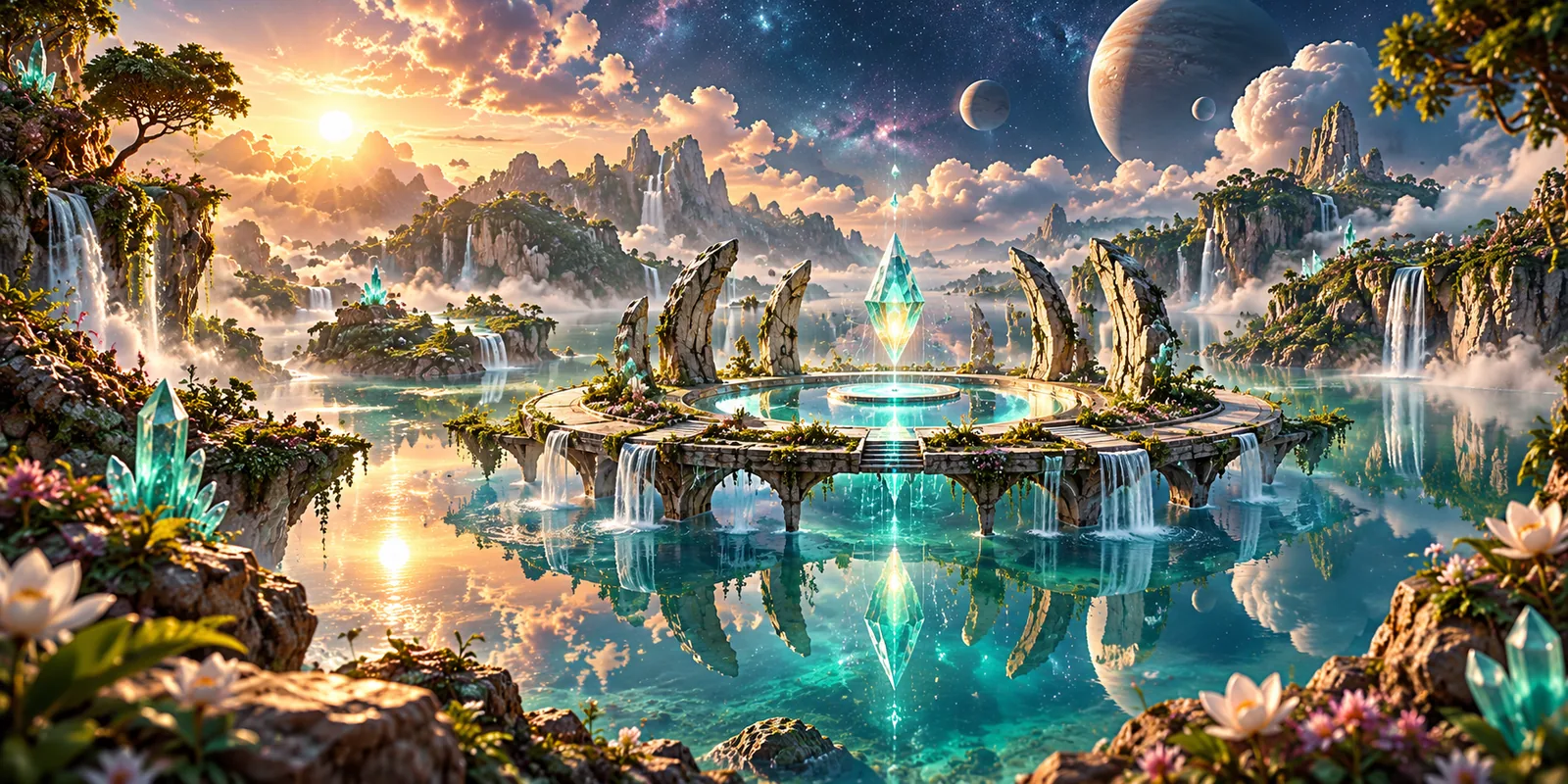
The motion is deliberately calm — easy to miss if you expect a movie. Compare the video with the still source:
- The large waterfall on the left — strands accelerate downward, and a spray cloud rises at the base and swells whenever another “surge” of water arrives.
- Clouds and mist — motion inside the cloud masses while the mountain silhouettes stay still.
- The lake and small waterfalls — gentle ripples on the water; highlights and droplets slide down the small falls.
- The large planet — its surface pattern turns slowly while the silhouette and lighting stay the same.
- Cliffs, crystal, columns, flowers — still on purpose: this is the source’s rigid geometry.
Stack
What it was made with
Source artwork, water and cloud motion, three-dimensional effects and video assembly are different tasks, each handled by a suitable tool.
OpenAI image_gen
A wide 2:1 scene from a written brief and a style reference. The original is kept unchanged.
Text2Cinemagraph
The pretrained video generator from the research project “Text-Guided Synthesis of Eulerian Cinemagraphs” (SIGGRAPH Asia 2023): it moves image features along a motion field and decodes the frames.
The model in code
Class networks.SPADEUnet4SoftmaxSplating with the published video_net_G.pth weights from the official repository, commit 57a8159. Only this generator is taken from the original pipeline: its Stable Diffusion image creation, ODISE segmentation and text-driven motion prediction are not part of this route.
Blender 5.2.3 LTS
A procedural water sheet, a volumetric spray cloud, Geometry Nodes particles.
Python: NumPy, OpenCV, Pillow
Masks and motion fields, the isolated network input, planet rotation, linear-light layer assembly, measurements.
FFmpeg 8.0
WebP for the app, H.264 encoding, timestamp-only slowing, full decoding during checks.
Neural synthesis and rendering ran on a single NVIDIA RTX PRO 6000 Blackwell (96 GB). Art direction and the motion requirements are the author’s own; the code for the masks, the Blender scene, assembly and checks was written with the AI coding assistants Codex and Claude. Language models do not draw the frames: those come from the neural generator and the Blender render.
The task
Why animate the scene, and what makes it hard
In the Praktika app, programmes and practice sets have their own scenes — wide panoramas in the style of a detailed fantasy game. There are 38 of them. A still picture works, but a living scene conveys the atmosphere much better: water flows, clouds breathe, the world feels real. The task is simple to state: bring a finished illustration to life.
The difficulty is that three requirements have to hold at the same time:
- Keep the picture. The composition, detail, colour and light of the artwork must not drift. A cliff cannot turn rubbery, the crystal cannot change shape, and the planet cannot move.
- Visible but calm motion. Water flows down, mist and clouds change from within, and it all looks natural rather than like jittering pixels.
- Long repetition without a seam. The scene may stay on screen for minutes, so the end of the clip has to flow into its beginning unnoticed — no jump, flash or “rewind”.
The third requirement turned out to be the hardest, and it shaped the whole method.
The source image
Where the source artwork came from
The scene was created with the OpenAI image_gen image generator. Generation was reference-guided: together with the brief, it received one of the app’s existing scenes — purely as a benchmark for quality and palette, not as a picture to repaint. That keeps new scenes in the same visual world.
The prompt was written not as a “magic phrase” but as a shot brief. It states the purpose — a decorative panorama for a spiritual-growth programme, not a progress badge. It describes the style to take from the reference: realistic fantasy rendering, depth, turquoise and emerald, warm golden light, a cosmic sky. It describes the content: a circular stone sanctuary above a mirror-still turquoise lake, a glowing crystal over the central pool, cliffs and flowers in the foreground, delicate waterfalls between distant terraces, moons and their reflections. It fixes a 2:1 format with the condition that the focal subject reads on a 390-pixel-wide screen. And it lists exclusions: no people, no text, no interface and no religious emblems.
Excerpt from the actual prompt
Quoted verbatim except for the omissions marked with an ellipsis.
One polished wide cinematic environment illustration for a mobile spiritual-growth program. Input reference STYLE/QUALITY ONLY: detailed realistic fantasy 3D game rendering with immense atmospheric depth, warm amber and jade-turquoise tones, beautiful material detail and a cosmic sky. New scene: serene circular stone sanctuary floating just above a mirror-still turquoise lake, a subtle luminous crystal suspended above its open central pool, soft rays illuminating mist, graceful cliffs and flowering plants frame foreground, delicate waterfalls connect distant terraces. Cosmic moons reflected in water, natural nonreligious sanctuary… Wide 2:1 panorama, visual focal pool/crystal readable on 390px screen… No text, no UI, no religious emblems, no people; decorative program art, not rank progression.
Variants are selected by hand: does the crystal read on a small screen, are there artefacts, do reflections agree with the light, does the style match the neighbouring scenes? The selected frame becomes the reference for everything that follows.
The original 1774×887 PNG is kept unchanged. For the app, a WebP copy was made with FFmpeg — that is the still scene users see. The animation starts from that same copy: its pixels are decoded, pinned with a checksum and brought to a 1280×640 working grid. The living scene therefore matches the still one, while the original stays untouched.
Image generation and animation are separate stages with separate tools. The image generator does not make video, and the video model does not repaint the scene.
Rejected routes
What did not work, and why
Before the final route there were several attempts. Each contributed something, but none met all three requirements at once. These are conclusions for this particular task, not verdicts on the tools.
A neural network animates the whole frame
The first route was Kandinsky 5.0 I2V Pro (SFT): an image and a motion description go in, a native 5-second clip comes out. The scenes genuinely came alive — foliage stirred, clouds and water changed.
Takeaway: natural motion inside a clip does not make it a loop. The last frame does not match the first, so a hard seam remains on repeat. We chose not to stretch the short clip artificially.
Forward, then backward
The classic way to hide a seam is to join a clip to its reversed copy. For clouds that is sometimes tolerable.
Takeaway: the water starts flowing upward. That is unacceptable for a waterfall, so reverse, ping-pong and backward rotation are excluded from the method entirely.
Dissolve the end into the beginning
The last seconds can be blended over the first ones, and formally the seam disappears.
Takeaway: a global crossfade produces double exposure and “breathing” sharpness, and the eye notices the pulse at regular intervals. Here the seam is never masked by fading the whole scene; only individual particles fade in and out.
Pushing pixels along a motion field
Early attempts moved the contents of the entire frame along a computed motion field.
Takeaway: neighbouring pixels travel with the water. Tree trunks and pieces of rock appear as ghosts in the clouds, and planets turn elastic.
Morphing and swaying them whole
It is tempting to sway or deform solid objects slightly as well — tree crowns, cliffs, planets — to make the scene feel livelier.
Takeaway: a painted cliff has no volume and no back side, so any movement reads as deformation, and a crown swaying as one piece looks like rubber. Solid things stay still; only fluids and air move.
A hybrid instead of a new magic model
The answer came not from switching neural networks but from splitting the scene into parts. Some stay as source, some are synthesised by a neural network, some are built as 3D/VFX, and everything is assembled on a common period. We reached this hybrid through iteration, not one lucky generation.
The method at a glance
The whole pipeline
Eight stages from image to file. Neural synthesis and rendering are used only where they are genuinely needed, and the output of every stage can be checked on its own.
Source artwork
A shot brief, generation from a style reference, manual selection.
Pinning the source
The PNG is stored unchanged; the animation starts from the app’s WebP copy, whose pixels are pinned with a checksum.
Masks and motion fields
Masks fitted to this scene: water, air, planet, rigid background, occluders; directed motion fields for the fluids.
Neural water and air
The generator receives the isolated clouds and mist, or the lake, together with an authored motion field, and returns closed layers: water 6 s, air 10 s.
Waterfall 3D/VFX
A procedural water sheet, a volumetric spray cloud and particles, rendered on the GPU.
Layer assembly
Compositing in linear light; foreground and solid objects keep the source pixels.
Loop and pace
Common period of 30 s and 750 frames; 1.5× slowdown by timestamps only.
Checks
Repeats and the join by eye; full decode, frame counts, flow direction, pixel identity outside the effect zone.
Scene preparation
Masks and a locked camera
The core rule of the method: the source illustration is a fixed backdrop. The camera does not move, and the frame neither pans nor zooms. Everything that is solid in reality — cliffs, the sanctuary’s columns, the crystal, trunks, flowers — remains source pixels.
To make that possible, the scene is marked up with semantic masks: the lake surface, clouds and mist, falling water, the large planet, and the foreground that overlaps the water — leaves, stones, flowers. The overlap order matters: the waterfall’s spray must pass behind the foreground stones, not be painted on top of them.
The masks are fitted to this particular picture. It is careful manual work, not a universal automatic segmenter: another scene will have its own waterfalls, its own occluders and its own light.
An isolated input for the neural network
Give the model the whole frame and it “sees” a tree trunk next to a cloud — and may well carry a piece of it into the sky. So the input for clouds and mist is prepared separately: the cloud regions are cut out, and everything around them is filled with the colour of the nearest cloud pixel. That input contains no cliffs, trunks or planets, so there is simply nothing solid for the model to drag along. It is an auxiliary layer and never reaches the final frame.
The lake is simpler: its motion field is non-zero only on the water, and only the lake mask is taken from that layer into the final frame. The small waterfalls are not animated by the network at all — finite-life particles slide down over the unchanged painting.
Neural synthesis · Text2Cinemagraph
Water and air
The lake surface, clouds and mist are animated with the video generator from the Text2Cinemagraph research project. In its original form it is a complete pipeline: it paints the image with a diffusion model, segments it, and predicts the motion from a text description. Only the last, animation stage is needed here: the image already exists, the masks were made for it, and the motion is authored by hand.
The generator follows the “Eulerian” cinemagraph principle. Motion is described by one static velocity field: at every point of water or air it says where and how fast things flow. We did not ask the model to guess this field; we drew it from the masks: lake water drifts slightly, rings spread out from impact points, clouds drift sideways and mist rises a little.
- Features. An encoder turns the input image into a multi-channel feature map and estimates a “weight” for every point — how much it should count if several points land in the same place.
- Displacement. To produce frame t, the velocity field is integrated step by step t times, so every point knows where it has travelled by that moment.
- Forward and backward transport. Features are carried forward from the source along the field and, at the same time, backward “from the end of the period”, against the field. The transport is soft (softmax splatting): when several points land in one place, their contributions are blended in proportion to their weights, and the point with the larger weight dominates.
- Blending and decoding. The two transports are blended with a weight that changes linearly from the start of the period to its end, and a decoder turns the features back into an image.
The loop works because the “start” and the “end” are the same image. In the first frame only the forward transport over zero steps is active, in the last frame only the backward transport over zero steps, so both produce the same frame. Meanwhile the visible motion always points forward: the water never flows back, it simply arrives at its initial state by the end of the period. All of this happens inside the water and air masks — not two pieces of video overlaid across the whole frame — which is why the texture of water and clouds moves from within instead of sliding as one piece.
Each layer has its own closed period: the water surface 6 seconds (150 frames), the atmosphere 10 seconds (250 frames). The network computes each period once; repeats within the scene reuse the finished frames.
More detail: resolution and colour
- The network runs on a 1024×512 grid. The finished layer frames are scaled to the size of the source artwork and inserted through soft-edged masks.
- For water, only luminance is taken from the network output, and colour comes from the source, with smooth local calibration. For air, the full colour is calibrated. The network adds motion but does not change the palette.
- The blend weight between forward and backward transport for frame t is α = 1 − t / N, where N is the period length in frames.
The planet rotates but does not move
The large planet is animated separately, without a neural network. An image of its surface is projected onto a sphere, and the sphere turns slowly around its axis. The silhouette, the position of its centre and its lighting stay as in the source; only the surface pattern changes. The planet layer closes after 30 seconds. The small planets are left still.
Why this was not enough
The layered version — neural air and water plus particles on the waterfalls — already looked alive. But the main waterfall still looked mostly painted: highlights and droplets moved, not the water itself. So it was rebuilt with 3D/VFX.
3D/VFX
A waterfall built in Blender
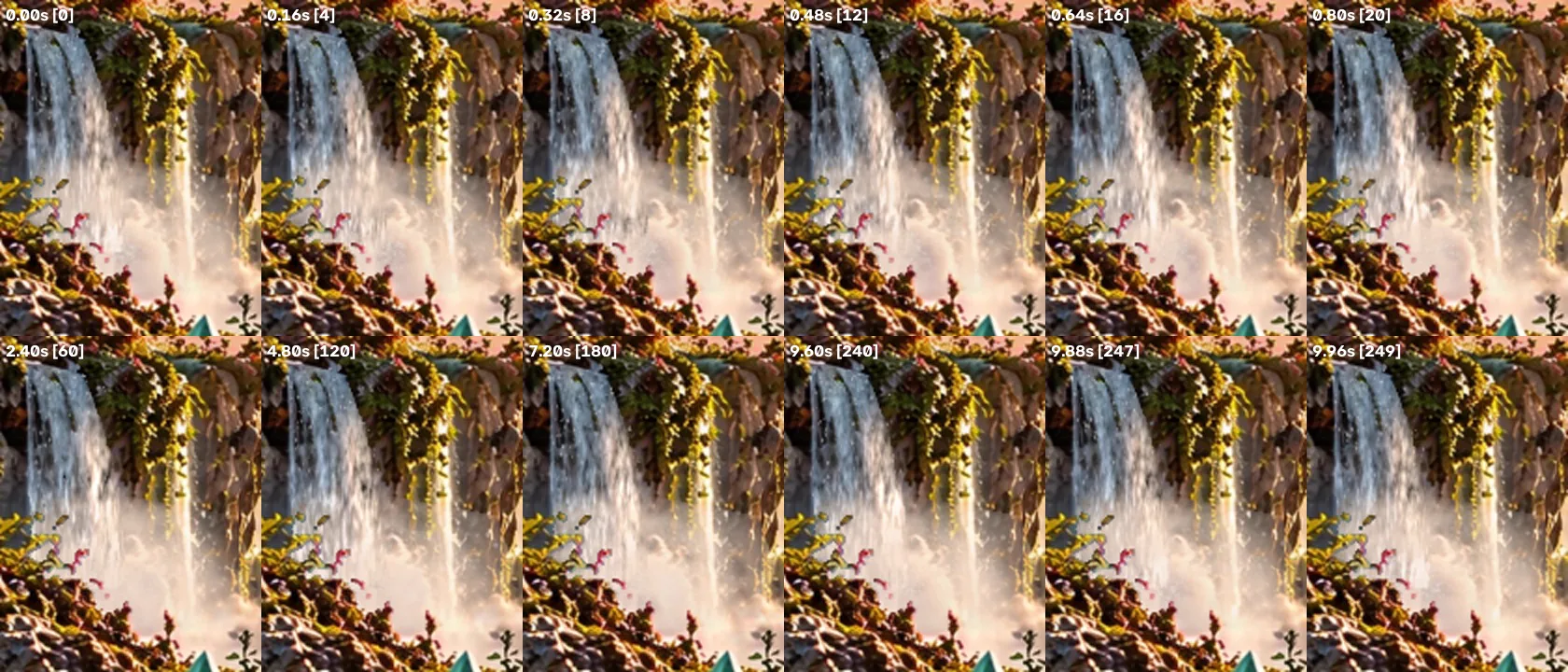
The most prominent object in the scene is the large waterfall on the left. It was not animated by a neural network; it was rebuilt as a stylised visual effect in Blender and rendered with Cycles on the GPU.
The camera is orthographic and locked so that a render pixel matches a pixel of the working grid. Only the waterfall region is rendered, with extra resolution.
The water sheet
The water is a procedural material on a geometry “card” shaped like the painted waterfall. Its texture coordinate is the ballistic time of flight from the lip: d = v₀·τ + g·τ²/2. Near the lip the strands are dense and slow; lower down they accelerate and stretch, like real falling water. The initial speed and acceleration are fitted to the painting of the particular waterfall.
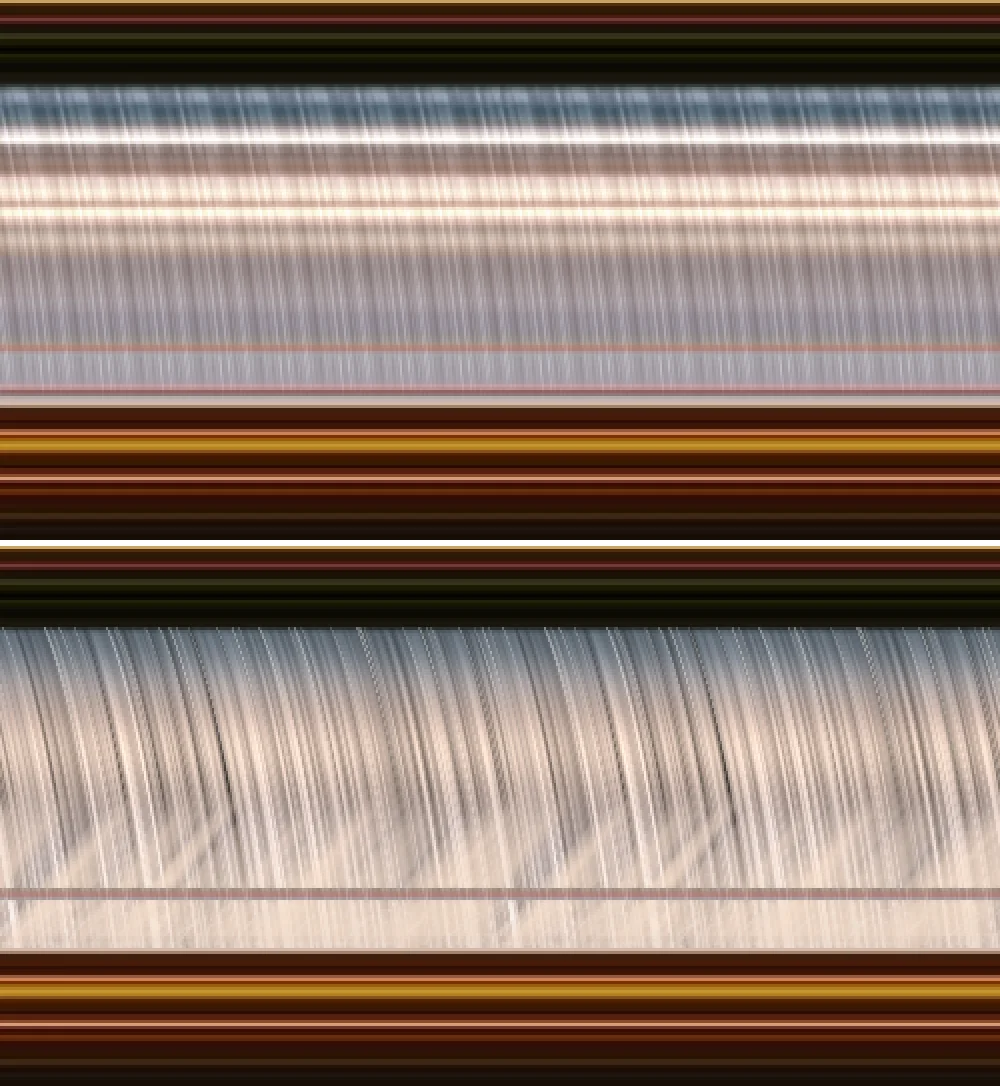
How do you make a material move only downward and still return exactly to its initial state after 10 seconds? The material coordinate p = τ − t, time of flight minus the current time, is turned into an angle and placed on a circle in two dimensions of four-dimensional noise. Along the circle the noise is periodic, while the coordinate itself keeps moving downward. After one period the circle closes and the strand pattern matches the first frame — no crossfade, no ping-pong, no reverse leg.
“Surges” run along the sheet — periodic thickenings of the flow defined by several harmonics with a whole number of oscillations per period. The base colour comes from the painted waterfall itself, smoothed along the direction of fall, so the new water keeps the source palette.
The spray cloud
At the base sits a volumetric cloud: rays are marched through a procedural density with self-shadowing and a backlit sun. Billows spread out from the impact line, and the cloud’s density follows the same water surges, delayed by exactly the fall time. When a thickening of the flow reaches the bottom, the cloud swells.
Spray and drizzle
Three Geometry Nodes particle sets, each with a finite lifetime: droplets breaking off the face of the waterfall; ejecta thrown up from the impact that fall back down; and drifting drizzle. Every particle has a whole number of lifecycles per period, so only the particles themselves fade in and out — the scene as a whole never needs to fade.
Waterfall parameters in this scene
- initial speed at the lip v₀: 20 pixels per second;
- acceleration g: 59.5 pixels per second²;
- fall from lip to base: 1.7 seconds;
- period: 10 seconds, 250 frames at 25 frames per second;
- the waterfall region is rendered at twice the resolution and then downsampled, using about 5 GB of video memory.
The values are fitted to this illustration; another waterfall will need different ones.
This is stylised VFX, not a fluid-dynamics computation: no Navier–Stokes solve and no full 3D reconstruction of the painting. The goal is plausible, directed, closed motion in the style of the source artwork.
Assembly
A hybrid, not a frame out of Blender
The final frame is not made entirely in Blender. A short Python script using NumPy and OpenCV assembles the layers:
- the base is the layered scene, with animated air, lake water, particles on the small waterfalls and the rotating planet;
- the rendered water sheet replaces only the mask of the large waterfall’s body;
- the spray cloud and particles are composited in linear light rather than gamma-encoded values, so the translucent mist blends with the background plausibly;
- foreground occluders — stones, flowers, leaves — keep the base frame’s pixels, and the spray passes behind them;
- outside the effect zone, every pixel of all 750 frames matches the base frame bit for bit; the zone itself covers about 1.2% of the frame area.
The final scene combines neural motion in the lake and clouds, procedural waterfall effects and rotation of the planet’s surface. These layers form a single composition.
Seamlessness
The arithmetic of a forward loop
Each layer has its own period. The scene closes only when all layers return to their initial state at the same time, which is at the least common multiple of their periods.
LCM(6, 10, 10, 30) = 30 seconds, or 750 frames at 25 frames per second. The 10-second waterfall component fits into the scene exactly three times. A 10-second excerpt on its own, however, is not a closed scene: in that time the lake water completes 1⅔ of its cycles and the planet a third of its period, so there would be a jump at the join. The join can only be checked over the full 30-second period.
Slowing down without new frames
The assembled cycle lasts 30 seconds. To make the background scene calmer, the pace is reduced by a factor of one and a half. No in-between frames are generated and the video is not re-encoded. FFmpeg copies the encoded stream as it is and only multiplies each frame’s timestamps by 3/2. The same 750 frames now play over 45 seconds, at roughly 16.7 frames per second. Every frame’s data is identical to the source, the order is preserved and the timestamps are stretched by exactly 1.5×.
ffmpeg -i scene30s.mp4 -map 0:v -c copy -video_track_timescale 90000 \
  -bsf:v "setts=pts=PTS*3/2:dts=DTS*3/2:duration=DURATION*3/2" scene45s.mp4
It is worth verifying the frames after this operation: an old bundled FFmpeg build using a generic timestamp formula lost two frames from a 10-second excerpt containing 250 frames. So after retiming, the count, order and content of all frames are checked.
The page carries exactly one 45-second cycle, and the browser repeats it. The transition you see on repeat is the real join between the last frame and the first.
Quality control
How to check a loop
Metrics are necessary, but they do not prove beauty or naturalness. So checking happens on two levels.
By eye
- the full cycle and several repeats in a row, especially the moment the end turns into the beginning;
- direction: water flows only downward, including at the join, and the impact and spray respond to the flow;
- occluder edges: spray does not creep over stones and leaves;
- source integrity: geometry, detail and colour intact, no ghosts, no “breathing” sky and no rubbery shapes;
- close-ups and time-based storyboards.
With tools
- full error-free decoding of every file, frame counts and duration checks;
- optical flow across the waterfall body: motion points downward in every frame, including across the join;
- the frame difference at the join is comparable to the ordinary difference between neighbouring frames;
- bit-exact pixels outside the effect zone;
- file checksums and saved build parameters, so the result can be reproduced.
Limits of the method
What the method can and cannot do
It is a way of working with a specific illustration, not an automatic animation factory.
- What is reproducibleA locked camera, the source as a rigid backdrop, isolated neural synthesis of fluids, procedural VFX for the main water, linear-light assembly, a common period and slowing without new frames. Code, masks and parameters are kept together with the result.
- Hand fittingMasks, motion fields, waterfall kinematics and overlap order have to be fitted to each illustration. There is no automatic transfer to an arbitrary picture.
- Stylisation, not physicsThe water reads as stylised procedural 3D water rather than brushwork; its strands are softer than the painted ones. No fluid dynamics are computed.
- Trade-offs in this sceneThe spray cloud mutes the lower third of the waterfall and warms its colour slightly, and faint mist halos are visible around the leaf edges on the left. The other waterfalls are animated more simply, with highlights and droplets over the painting; the small planets are still.
- Judgement is visualMetrics screen out technical defects, but the naturalness of motion is judged by eye, over the full cycle and its repeats.
Discuss a project
Need a living scene or a visual pipeline?
We will look at the source artwork, the motion requirements and the display format, and give an honest view of where this method fits and where another route is better.